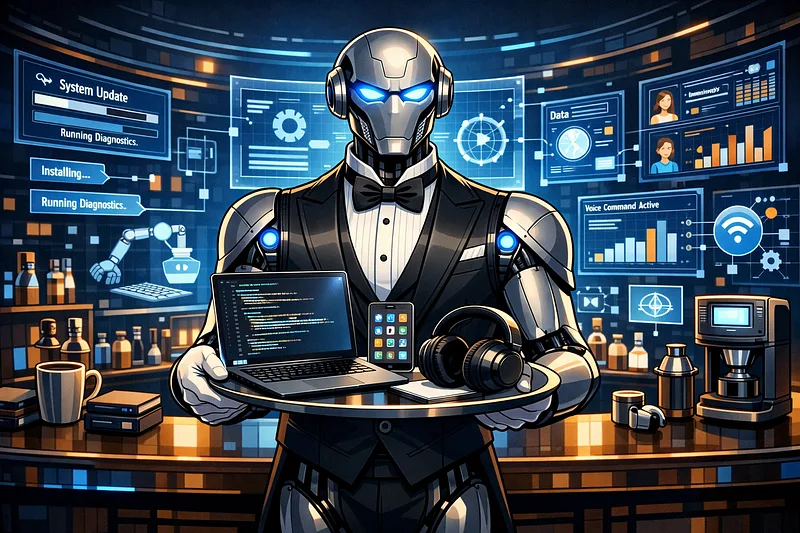
We’ve reached 2026, and with that we’ve reached the ̶E̶r̶a̶ ̶o̶f̶ ̶A̶G̶I̶, I mean the Era of AI Agents!
You’ve probably seen OpenClaw and other tools where you have a “personal assistant” at your disposal. And now Claude Code is coming in strong with Dispatch. Until not too long ago, AI assistants worked like a sophisticated question-and-answer layer. Now they’re starting to operate as orchestrators: they observe events, choose tools, delegate subtasks, monitor processes, and execute entire flows.
And that’s exactly what I built into my personal workflow. I called this system NeoAtlas: an arrangement in which Claude Code works as the brain and orchestrator, connected to Telegram through Claude Code Channels. When it needs specialized execution, it delegates to GPT 5.4 through Codex CLI, local LM Studio, or direct SSH. The result is a personal assistant that I actually use in day-to-day work.
What is Claude Code Channels
Claude Code Channels is a feature launched by Anthropic to push external events into an active Claude Code session. In practice, this makes it possible to connect Claude Code to channels like Telegram and Discord, so messages arrive directly to the agent running in your environment.
That changes the nature of the system. Instead of depending on you being in front of the terminal, Claude starts receiving messages, alerts, and commands while the session is open. It’s the bridge between chat and real execution.
And what is Dispatch?
Dispatch is a Claude Cowork feature that creates a persistent thread between your phone and your desktop. Instead of opening a new session for each task, Dispatch keeps a single continuous thread of conversation — Claude retains context from previous tasks, and you can send commands from your phone while the agent works on your computer.
In practice, it works like this: you open Claude Desktop, enable Dispatch, and from that point on you can send tasks through the Claude mobile app. Claude executes on your desktop — opens apps, browses in the browser, fills out spreadsheets, runs tools — and replies when it’s done. Combined with Computer Use (launched in March 2026), Dispatch lets Claude literally operate your computer while you’re away from it.
If Channels (Telegram/Discord) are the bridge between chat and execution for developers through CLI, Dispatch is the more polished and integrated version of that same idea, aimed at Cowork — without needing to configure bots or flags in the terminal.
The key difference: Channels connect messaging apps to Claude Code (terminal), while Dispatch connects the mobile app to Claude Cowork (desktop). Both solve the same problem — interacting with the agent remotely — but for different audiences and workflows.
The delegation architecture
The most important point isn’t just connecting Telegram to Claude. The jump happens when you design the delegation architecture well and give each piece a clear role.
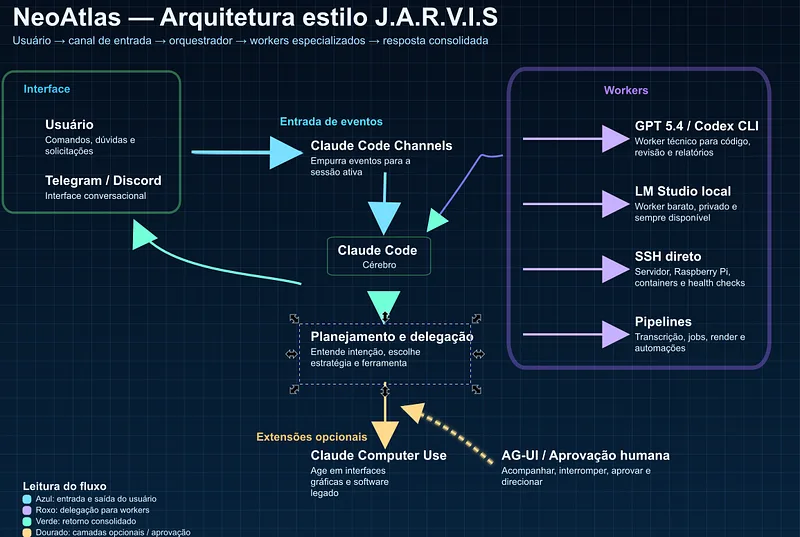
Claude Code — The Orchestrator
Claude Code is the one that decides, plans, and coordinates. It receives the Telegram message, understands the intent, chooses the strategy, and distributes the work. This is the right place to spend more expensive tokens: where there is ambiguity, broad context, and decision-making.
GPT 5.4 via Codex CLI — Our Agent
When the task is working with code, reviewing files, generating technical reports, or investigating a codebase, the idea is to delegate to GPT 5.4. It works as a specialized worker for technical production.
This is excellent for requests like:
- “open project X and review the latest diff”
- “generate a fix for this bug and tell me the risk”
- “create a script to automate this routine”
Claude stays at the top, but it doesn’t need to do the operational work by itself.
Local LM Studio = cheap local worker
Not every task deserves a premium model in the cloud. To summarize logs, classify messages, answer simple questions, or do initial triage, the idea is to use local LM Studio, running locally. It comes in as a cheap, private, and always-available worker.
Direct SSH = infrastructure
There’s a fourth pillar that a lot of people ignore: **infrastructure doesn’t need to become a framework**. In many cases, the best path is to use direct SSH. In my workflow, this serves to monitor and operate Raspberry Pi, Linux server, services, processes, temperature, disk, and health checks.
Why adopt this strategy?
The idea is to have multiple models to organize spending on tokens. With Claude as the brain, you can delegate other tasks to other agents. And this strategy also applies to Codex, in case you want a different system, even a local one.
But is it really worth using Claude as the brain?
Well, here I believe it comes down to personal preference. But it’s possible to use Codex or even a local model; what changes is the usage strategy.
Using the Codex SDK you can do something similar to what Claude released with Dispatch. You’ll need to do polling to keep listening to your Telegram bot, and from there it’s all good. Here’s a simple example of how this can be done.
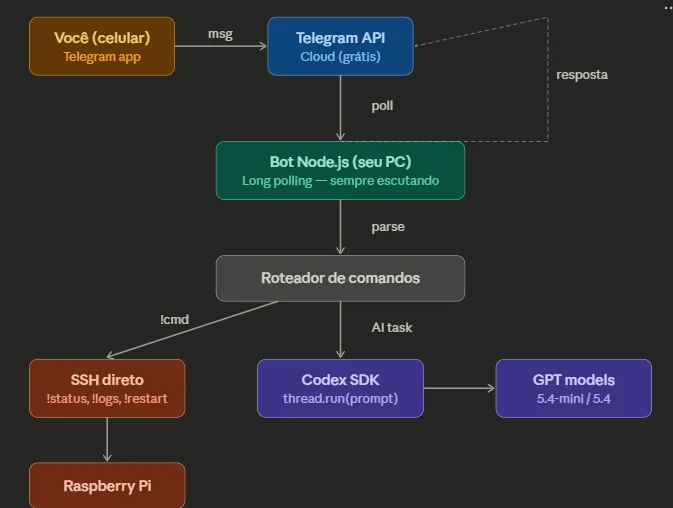
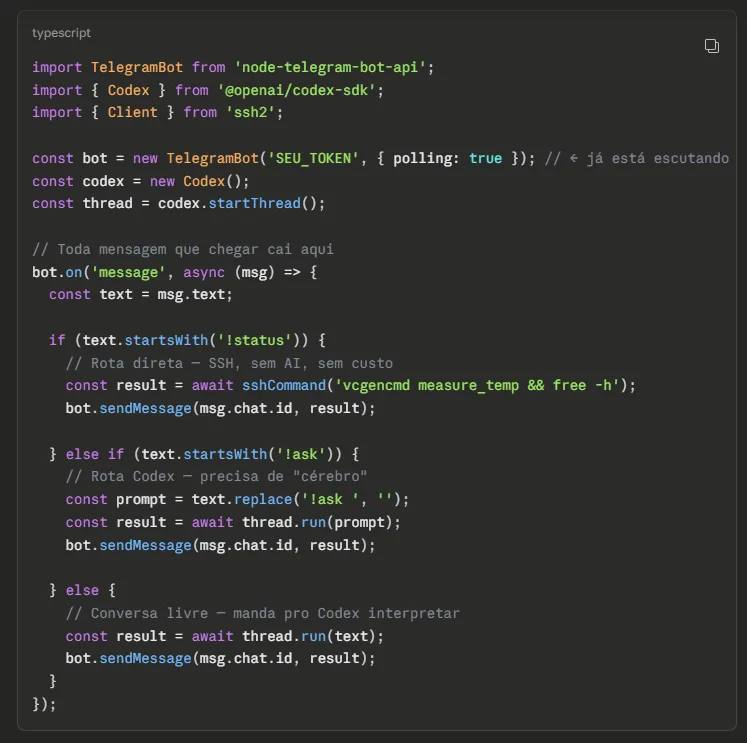
Yes, Claude generated that code!
And if you want a local model like GPT OSS, you can use the same Polling strategy, the difference being that you’ll hit the LM Studio or Ollama API when making the call;
So what can you actually do with your JARVIS?
The possibilities are whatever you can imagine. But instead of just listing them, I’ll show concrete examples of how I use this in day-to-day work.
1. Control services on the server through Telegram
I run several bots and services on my Raspberry Pi. Before, to restart a service or check whether something had gone down, I had to open the terminal, connect through SSH, and investigate. Now I send a message on Telegram: “check the status of newsBot and restart it if it’s down”. Claude receives it through the Channel, executes direct SSH on the Raspberry Pi, checks systemctl status, restarts it if necessary, and replies with the result — all without me leaving my phone.
2. Generate and review code from your phone
I’m on the bus and remember a bug I need to fix. I send this on Telegram: “open the BinanceBot project, find where the dynamic stop loss logic is and suggest a fix for the edge case when ATR is zero”. Claude delegates to Codex CLI, which analyzes the code, identifies the relevant section, generates a fix suggestion, and sends it back to me on Telegram with the diff. When I get home, I just need to review it and do the merge.
3. Monitor bots and pipelines remotely
I have a trading bot running 24/7. I configure a health check through Channel: at a certain interval, Claude checks whether the bot is responding, whether the balance is within expectations, and whether there were any errors in the latest logs. If something is out of the ordinary, it sends me an alert on Telegram with a summary of what happened. I don’t need to keep watching a dashboard all the time.
4. Transcribe audio and generate articles
This is one of my favorite workflows. I record audio on my phone with ideas for an article, send it through Telegram, and the system transcribes it using Whisper, cleans up the text, organizes it into topics, and generates a draft in Markdown. This very article you’re reading went through a similar flow — the base came from audio transcribed and organized by the system.
5. Trigger AI video generation pipelines
When I need to generate a video with AI for some content, I send the prompt through Telegram and Claude triggers the local pipeline on my setup with ComfyUI + Wan2.1. It configures the parameters, starts the generation, and lets me know when the video is ready — without me needing to open ComfyUI manually.
6. Automated research and curation
I ask through Telegram: “research the latest news about AI agents and give me a 5-paragraph summary”. Claude uses the appropriate worker (GPT through Codex CLI or a local model) to do the research, synthesizes the content, and delivers the formatted summary.
And what is the AG-UI Protocol?
AG-UI stands for Agent-User Interaction Protocol. It’s an emerging, open, lightweight, event-oriented standard to standardize how AI agents communicate with user interfaces in a bidirectional way and in real time. In simple terms, it solves the layer through which humans follow, interrupt, approve, and direct what is happening.
You can think of AG-UI as the trunk of the new agentic architecture. If MCP helps the agent talk to tools and data, and other protocols help agents talk to each other, AG-UI organizes the conversation between agent and interface.
That’s why Claude Code Channels stands out. Even though it isn’t “the official AG-UI,” it’s a very concrete implementation of that same core idea: events enter a live session, the agent reacts, can reply through the same channel, and can even deal with remote approvals. It’s no longer a static UI for chat, but a live flow between user, agent, and system.
But didn’t Anthropic launch Claude Computer Use? Isn’t Open AI going to launch a new assistant, and we also have OpenClaw? Why should I use this one?
Well, if you want something fully customized or maybe local without the need for a connection or sending data to the cloud, this can be an interesting path, but to be honest, this article will probably become outdated pretty quickly; eventually we’ll have other ways to create and use agents.
Conclusion
We’re living through the transition from passive assistants to active agents. That’s the central point.
The value is no longer just in asking questions to a good model. The value is in building systems where a model decides, observes context, delegates, executes, monitors, and comes back with a useful answer in the channel you’re already in. When you put together Claude Code, Telegram, delegation to workers, and real access to your infrastructure, the result stops looking like a demo and starts looking like an operational coworker.
You don’t need to wait for AGI for this. With the right tools, you can build a functional Jarvis today. Maybe we’re still far from AGI, but we’re not that far from a pretty clever artificial intelligence.
📌References
- Anthropic. “Push events into a running session with channels.” Claude Code Docs, March 2026. Available at: https://code.claude.com/docs/en/channels
- Anthropic. “Claude Code overview.” Claude Code Docs, 2026. Available at: https://www.anthropic.com/engineering/claude-code-best-practices
- Anthropic. “Put Claude to work on your computer.” Anthropic Blog, March 23, 2026. Available at: https://www.anthropic.com/news/computer-use-cowork-claude-code
- Taft, Darryl K. “Anthropic’s response to the AI tool that caused lines around the block in Shenzhen.” The New Stack, March 14, 2026. Available at: https://thenewstack.io/claude-dispatch-versus-openclaw/
- CNBC. “Anthropic says Claude can now use your computer to finish tasks for you in AI agent push.” CNBC, March 24, 2026. Available at: https://www.cnbc.com/2026/03/24/anthropic-claude-ai-agent-use-computer-finish-tasks.html
- Viticci, Federico. “First Look: Hands-On with Claude Code’s New Telegram and Discord Integrations.” MacStories, March 2026. Available at: https://www.macstories.net/stories/first-look-hands-on-with-claude-codes-new-telegram-and-discord-integrations/
- VentureBeat. “Anthropic just shipped an OpenClaw killer called Claude Code Channels.” VentureBeat, March 2026. Available at: https://venturebeat.com/orchestration/anthropic-just-shipped-an-openclaw-killer-called-claude-code-channels
- CopilotKit. “Introducing AG-UI: The Protocol Where Agents Meet Users.” CopilotKit Blog, 2025. Available at: https://www.copilotkit.ai/blog/introducing-ag-ui-the-protocol-where-agents-meet-users
- AG-UI Protocol. “AG-UI Overview — Agent User Interaction Protocol.” Official documentation, 2026. Available at: https://docs.ag-ui.com/introduction
- AG-UI Protocol. Official GitHub repository. Available at: https://github.com/ag-ui-protocol/ag-ui
- Amazon Web Services. “Amazon Bedrock AgentCore Runtime now supports the AG-UI protocol.” AWS, March 13, 2026. Available at: https://aws.amazon.com/about-aws/whats-new/2026/03/amazon-bedrock-agentcore-runtime-ag-ui-protocol/
- Bellan, Rebecca. “Anthropic hands Claude Code more control, but keeps it on a leash.” TechCrunch, March 24, 2026. Available at: https://techcrunch.com/2026/03/24/anthropic-hands-claude-code-more-control-but-keeps-it-on-a-leash/
- Dannon, Roi. “Agent-User Interaction Protocol: When the frontend got an AI protocol.” Via Engineering Blog, January 7, 2026. Available at: https://ridewithvia.com/resources/agent-user-interaction-protocol-when-the-frontend-got-an-ai-protocol